Features / Accessibility Checker
Enterprise Digital Governance: Automated WCAG 2.2
Compliance & Risk Mitigation


Cross-Platform Document Remediation for PDF, Word, and PowerPoint Documents
Elite Site Optimizer checks the accessibility of PDF, Word, and PowerPoint files, ensuring everyone can use all your documents. By evaluating and addressing accessibility issues, we help you create inclusive and compliant digital documents.
Advanced Accessibility Intelligence & VPAT Readiness
Our reporting engine doesn't just find errors; it categorizes data for stakeholders at every level:
 For Executives: High-level compliance health scores and historical trend lines to track risk reduction over time.
- For Developers: Precise CSS/XPath selectors and AI-guided remediation snippets to slash "Mean Time to Repair" (MTTR).
- For Legal Teams: Automated data exports to support VPAT (Voluntary Product Accessibility Template) generation and ACR documentation.
Benefits of ESO Accessibility Checker Feature
- Visual Integrity & UX Optimization: Automated contrast validation for low-vision and mobile-first environments.
- Multi-Jurisdictional Compliance: Stay ahead of ADA Title III, AODA, and EAA legal frameworks.
- Market Expansion: Unlock the $13T global disability market by removing conversion friction.
- Algorithmic Advantage: Leverage the high correlation between WCAG structure and Search Engine crawlability.
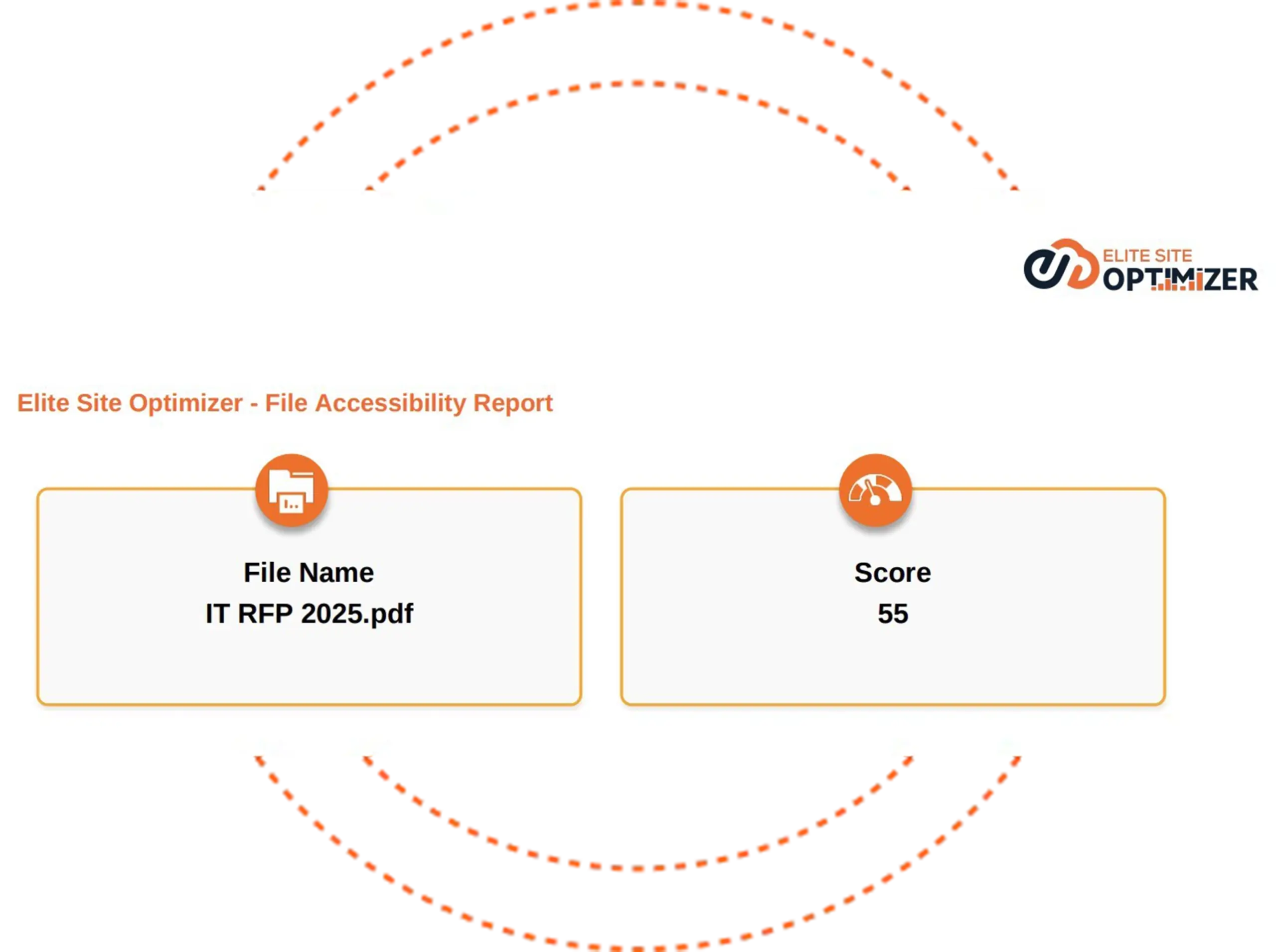
File Accessibility
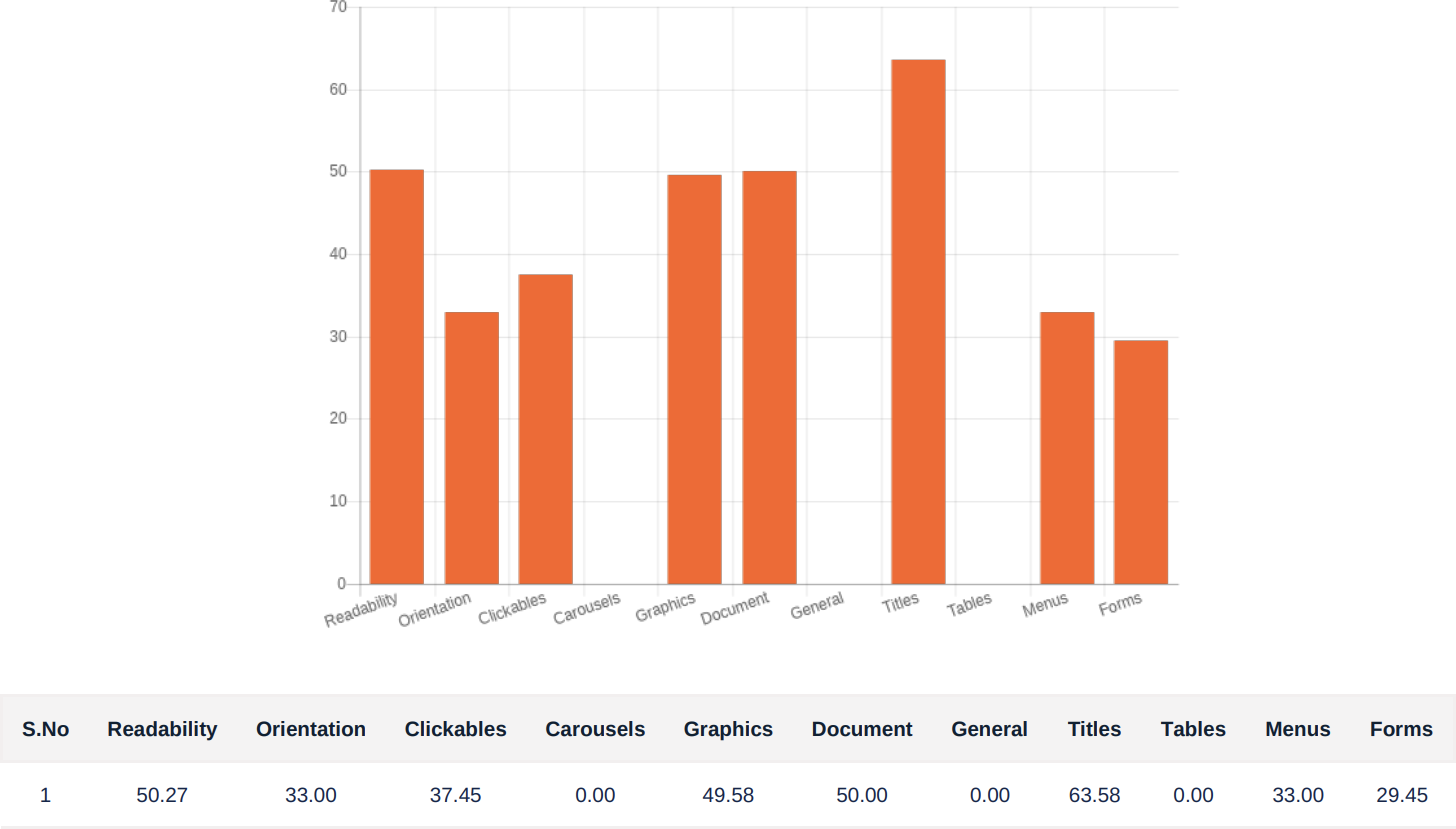
The file accessibility report provides a summary of accessibility issues found within the uploaded document. It shows the specific areas that need improvements to meet accessibility standards.
How ESO's Accessibility Testing tool Works
Ensure your website complies with WCAG and provides an inclusive experience for everyone:The Accessibility Checker from Elite Site Optimizer helps you identify issues that make it difficult for people with disabilities to access your website. It scans all of your web pages to find any violations of the WCAG 2.1 standards (Levels A and AA). This allows you to create a more friendly digital presence and comply with accessibility laws.
-
24/7 Automated Page Scanning
-
WCAG 2.2 Evaluation
Using advanced accessibility testing engines, ESO crawls and scans your website to identify potential accessibility issues. It inspects HTML, CSS, ARIA roles, and interactive elements to identify accessibility issues.
We check each page against the last Web Content Accessibility Guidelines (WCAG 2.2). The tool highlights problems that affect screen readers, keyboard navigation, people with visual impairments, and people with common disabilities.
-
Detailed Reports and Fixed Guidance
-
Continuous Compliance Monitoring
-
Issue Severity Classification
Elite Site Optimizer gives you easy-to-understand reports that you can use to fix problems, such as: Recommended fixes with guidance that is easy for developers to understand. This enables the development, QA, and content teams to quickly resolve issues without requiring extensive manual testing.
ESO helps your team monitor accessibility improvements over time by allowing you to schedule scans and track progress. Discover regressions, maintain WCAG compliance over time, and enhance the experience for all visitors.
To prioritize fixes, each issue is categorized into three categories as follows: Critical —blocks access completely (e.g., no labels on forms or inaccessible navigation). Serious —disrupts usability but might have partial workarounds (e.g., poor contrast or missing headings). Minor —best practices not followed (e.g., redundant ARIA labels or minor focus order issues).
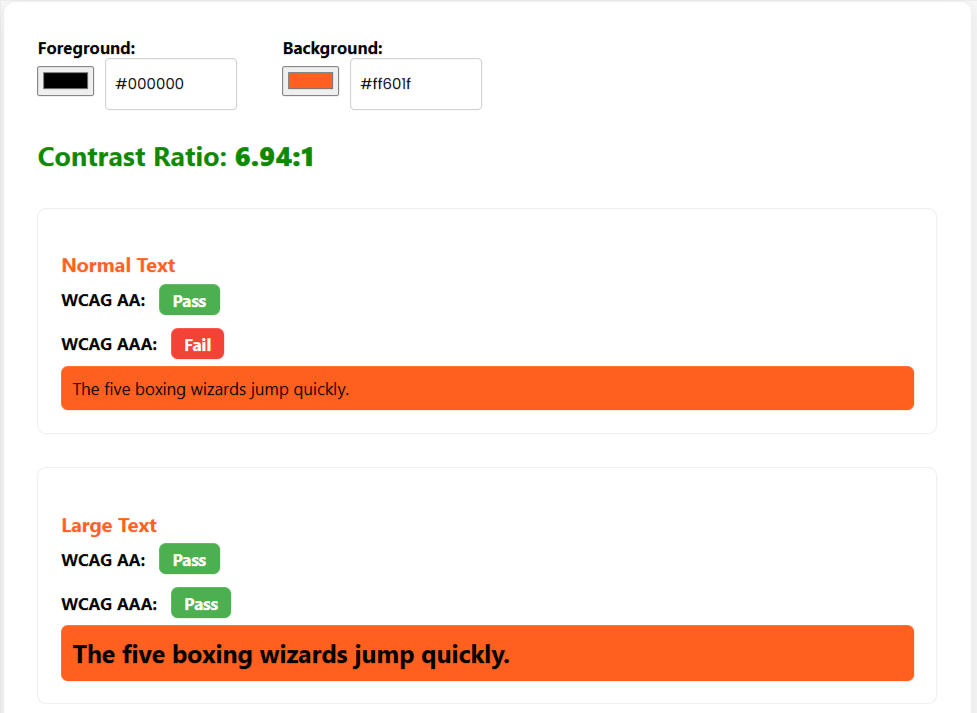
Color Contrast Checker
The Color Contrast Checker from Elite Site Optimizer helps teams make sure that text and interactive elements meet the WCAG 2.1 minimum contrast standards. Our tool checks the color combinations of the text and background on your website automatically to ensure that people with vision problems, such as color blindness and low vision, can read it. How Color Contrast Checker Works The tool scans all the text elements that are visible and checks them against the WCAG 2.1 standards. It precisely identifies minimum contrast ratios by flagging specific issues related to element references, color values, and actual contrast ratios.
Benefits of Color Contrast Checker
-
Make text easier to read for everyone
-
Make it easier to use on mobile devices and in low light
-
Support ADA, Section 508, and WCAG compliance
-
Reduce the bounce rate and make it more accessible to everyone
Each issue is classified as
-
Critical (impossible to read)
-
Serious (hard to read)
-
Minor (nearly a contrast)
Web Page Accessibility Analysis
 Reach a Wider Audience
Enhance User Experience and Customer Satisfaction
Demonstrate Your Commitment to Inclusivity
Ensure Compliance with Accessibility Laws
Improve Search Engine Optimization (SEO)
CI/CD Pipeline Integration
Headless Browser Scanning
Role-Based Access Control (RBAC)
Reach a Wider Audience
Enhance User Experience and Customer Satisfaction
Demonstrate Your Commitment to Inclusivity
Ensure Compliance with Accessibility Laws
Improve Search Engine Optimization (SEO)
CI/CD Pipeline Integration
Headless Browser Scanning
Role-Based Access Control (RBAC)
Get to know more about Accessibility
The full form of WCAG is the Web Content Accessibility Guidelines. These guidelines provide recommendations for making web content more accessible.
Making Web content more accessible to individuals with impairments is outlined in the Web Content Accessibility Guidelines (WCAG) 2.0. Disabilities ranging from visual and auditory to physical, verbal, cognitive, language, learning, and neurological are all included in the concept of accessibility.
The WCAG rules are divided into three levels of conformance to accommodate the needs of different groups and situations:
- A (lowest)
- AA (mid-range)
- AAA (highest)
An accessibility score is a metric that assesses how effectively a website works for people with impairments. It impacts both the usability and search engine rankings of the website.
WCAG compliance is crucial for fostering inclusivity and preventing legal repercussions. It ensures that digital information is accessible to all users, including those with disabilities.
Yes, implementing WCAG guidelines can Improve the user experience, potentially leading to higher search engine rankings due to increased usability and accessibility.
Enhancing color contrast, making keyboard navigation possible, captioning multimedia material, making sure that HTML is properly structured, offering informative alt text for images, and carrying out frequent accessibility audits are all steps that contribute to raising accessibility scores.
Warnings and errors indicate accessibility issues found during analysis:
- Error Count: Critical issues that violate WCAG standards
- Warning Count: Potential issues that may impact accessibility
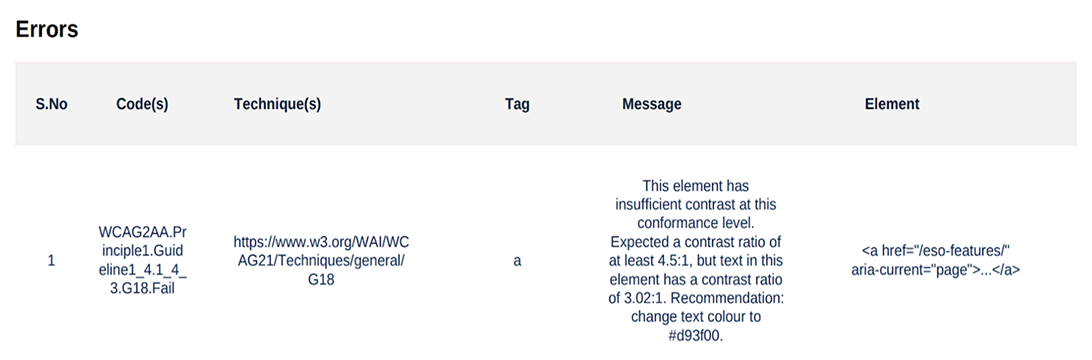
The Accessibility Score details page provides counts of Errors, Warnings, Notices and breakdown of each accessibility issue found on your website. For every issue, the following information is displayed:
- Code – The WCAG rule or error code related to the issue
- Technique – A reference link to the official WCAG technique or guideline
- Tag – The HTML tag where the issue occurs
- Message – A brief description of the problem
- Element – The specific line of code or element causing the issue
Notices refer to minor issues or suggestions for improvement on your website that do not directly violate WCAG guidelines but could enhance the overall accessibility or user experience.
It refers to a specific area in a web analysis or SEO tool where you can manage and view information related to your website's domain. Eg : Home Page: This often indicates the main URL of your website, where primary schema markup is analyzed.
You can add, edit and delete domain sections in the "Settings -> Domain Section Management" page.
You can download the summary of the report in PDF and CSV format. The detailed report of a single web page can be downloaded in PDF format.
Sometimes, the website's server firewall, defenders, and security plugins implemented may affect Elite Site Optimizer from crawling the website and generating reports. To avoid this situation, Elite Site Optimizer's crawler IPs should be whitelisted in the website's server firewall, defenders, and security plugins implemented for the website.
Please add the following IPs in your firewall:
- 1) 44.240.233.25
- 2) 35.82.149.10